Prerequisite
To access the EVault console, you need an EVault Backup account and its credentials (username and password). The username is displayed on the EVault Backup account
details page.
How to access the EVault console
- Access the EVault Backup account details page;
- in the BACKUP ACCOUNT STATUS section, select SIGN IN;
- use the EVault Backup account credentials available on the details page:
- User Name (in the format username\username);
- password (chosen when creating the EVault Backup account).
How to change the EVault Backup account password
- Access the EVault console;
- select your account name in the top-right corner of the console;
- select Profile settings from the list;
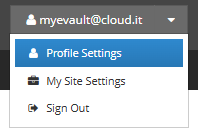
- to change your password, enter:
- Old password - your current password;
- New password - your new password (follow the password requirements provided);
- Confirm new password - confirm your new password;
- select Update password to confirm the password change;
- sign in again using your username and new password.