Block Storage service overview
With the Block Storage service, you can create highly scalable and flexible block storage volumes and connect them to
Aruba Managed Kubernetes or
Aruba Cloud Server services.
Replication modes
Block Storage is available in two modes:
- Availability Zone: stores your volumes in three replicas within the same zone;
- Regional: replicates synchronous copies of the volume across three different zones within the same region.
Volume types
Choose between two volume types:
- Block Storage Standard: volume optimized for workloads with moderate I/O requirements;
- Block Storage Performance: volume optimized for intensive workloads.
Volume technical specifications
- Volume size: from 1 GB to 16 TB;
- Storage type: SSDs with NVMe interface;
- Option to increase the volume size.
Bootable volumes
A bootable volume is a volume that contains a bootable operating system and can be used as the boot disk of a Cloud Server.
When
creating a Cloud Server, you can select an available bootable volume as the source instead of a template.
Possible volume statuses
The volume can have one of the following statuses:
- Creating
- Suspended
- Failed
- Not in use
- Active
- Updating
- Payment suspended
- Deleting
When action is required
- Suspended: the system verification checks have not been passed. Wait while the system retries the creation process. If the process is unsuccessful after several attempts, the status will change to Failed.
- Failed: check the activity log to identify the cause of the failure, then delete the volume.
- Payment suspended: your volume has been disabled due to insufficient credit. You need to top up your credit with enough credit to cover the cost of the service.
Kubernetes clusters
When you create or edit a
Kubernetes cluster, you can only set the maximum amount of storage space available. Storage volumes (logical data storage units) must be created using the Kubernetes console.
Use the Kubernetes console to edit or delete volumes generated for your clusters.
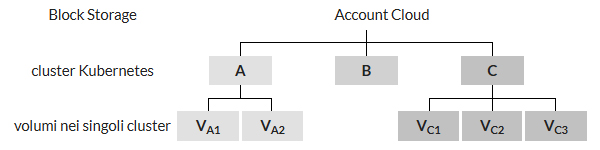
The GB limit you set for Block Storage defines the maximum total amount of space that all volumes in the cluster can use. In the example above:
- cluster limit A ≥ sum of volumes [ VA1 + VA2 ]
- cluster limit C ≥ sum of volumes [ VC1 + VC2 + VC3 ]